

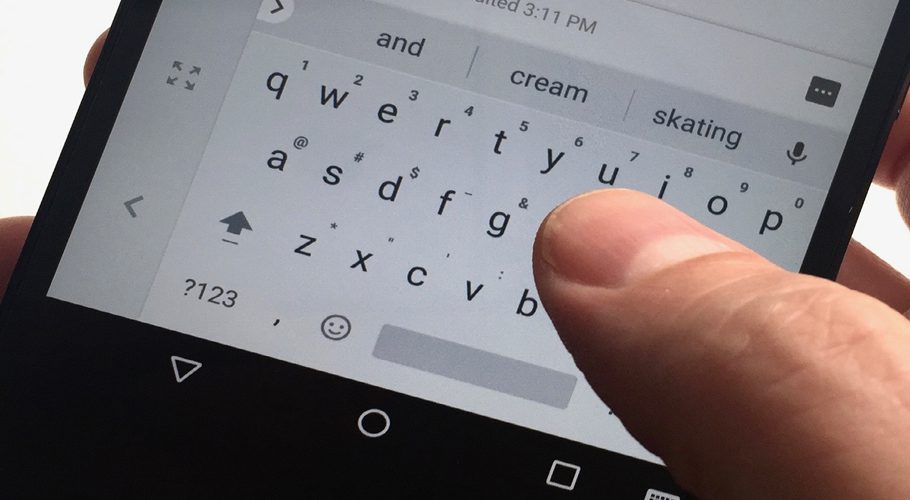
If asked what app you use the most on your phone, you probably would name either messaging, news, social media or gaming app, but in reality, it’s the keyboard app that every phone owner uses the most.
From editing to dictation, you can do way more with the keyboard on your smartphone than you may have thought. Give these easy tips a try; you might wonder how you ever got by without them. They work on both Android and iPhone devices.
Prediction Bar
Above the keyboard, a line appears with word recommendations as soon as you start typing. Three options are displayed: the exact keys that have been used thus far on the left, the most likely word in the center, and the second-most likely option on the right. The Prediction Bar is always helpful to keep an eye on since with only one tap, the entire word can be finished without additional typing. Before striking a space, tap the term on the left-hand side of the screen to automatically insert your typing. A space will replace a word that is unknowable or wrong with the word in the center.
One-Handed Mode
Using a phone keypad with one hand could be difficult, especially if your device has a larger display. However, there are functions included in the onboard software that might make using your fingers and thumbs to type more easily.
Use your iPhone to tap and hold the globe symbol (bottom left.) The keyboard can then be moved to the left, the right, or back to the center of the screen using three icons that appear.
There’s a similar feature over on Android. Here, hold down the comma key (bottom left) while swiping your finger over the rightmost of the two displayed icons. The keyboard can then be placed in the middle, to the left or to the right.
If necessary, iOS lets you move the keyboard to the left or right of the display.
Swipe to Type
Some people find that swiping is quicker and effective way to type instead of tapping. When you want to type a word, you move your finger around the keyboard, pause for a split second at each character you want to enter, and then raise it once you’re done.
Both the iOS and Android keyboards’ default settings ought to have this capability enabled. Simply tap and hold on the word’s first character, then swipe to type the remaining characters. To begin a new word, raise your finger, then repeat the action.
Check your phone’s Settings app to see if you have the feature. On iOS, go under General, Keyboard, and Slide to Type. On Android, look under System, Languages and input, On-screen keyboard, Gboard, and Glide typing.
Save Time Typing
Did you know that you could program your phone to use lengthier text strings instead of personalized acronyms? So instead of repeatedly typing “be there soon,” you can just type “bts” and let your phone handle the rest.
If you’re using an iPhone, go to General, Keyboard, and Text Replacement under Settings. The + (plus) button can afterward be used to add other shortcuts. The alternatives for these abbreviations will show up as corrections above the keyboard as you type.
On Android, select Dictionary and Personal dictionary by tapping the cog symbol above the keyboard. After selecting your language, you can hit the + (plus) button on the following screen to create additional shortcuts, which will once more show up as recommendations above the keyboard.
Use Your Voice
Another phone keyboard hack is to simply dictate text using your voice rather than using the keypad at all. You might discover that it’s much quicker, particularly when you don’t have both hands open to use your phone.
Whether you’re using an iPhone or an Android phone, turning on the dictation feature couldn’t be much easier. To speak, simply tap the microphone icon (located below the keyboard on the right for iOS users and above the keyboard on the right for Android users).
Soon you’ll be able to insert punctuation and other special characters by just saying them. Tap the microphone icon or the keyboard icon (iOS) once more to return to the default state (Android).
Text Editing
The keyboard on your phone can be used to select, modify, and move around text that you’ve already written in addition to for typing. This could be challenging to achieve depending on the size of your device’s screen.
Here, the iPhone keyboard’s useful feature may be useful: The keyboard will change into a trackpad if you hold down the Space key. You can more precisely move the text cursor by dragging your finger across this trackpad.
On Android, selecting Text Editing from the three-dot menu at the top of the keyboard will bring up the corresponding feature. The text cursor movement keys and quick access buttons for copy, paste, and selection are then available.
Emojis
It can be challenging to discover the precise emoji you’re looking for with a large number of emoji on devices. Use the search bar that appears above the keyboard after touching the emoji icon to browse the system on both Android and iPhone devices.
Press and hold on the emoji of your choice to access variations for things like skin tone and gender. You can choose the one you desire from a list of possibilities that will appear.
Another iPhone-specific tip is provided below: You can notice words that can be substituted with emoji start to light orange if you type out your message and then hit the emoji icon. To substitute for any glowing word, simply tap it.
Resize and Floating Keyboard
Both IOS and Android let you decide how large or small you want the keyboard to appear. Moreover, the keyboard can be moved to any location on the screen. This could be important for some apps which require a specific part of the screen to be available.
Change Keyboards
The software keyboard that comes preinstalled on your phone is not something you have to use forever: There are a variety of third-party options available for iOS and Android.
One of the most often used choices is SwiftKey. Microsoft created it, and it can be downloaded for free on iOS and Android. It tries to become increasingly accurate with predictions and auto-corrections over time by learning your typing style.
Try the freemium Typewise app for iOS and Android if you want to try something truly unique. With a distinctive honeycomb pattern and a variety of customization options, it claims to increase typing speed by up to 33%.