

No Result
View All Result
Tuesday, October 13, 2026
MM News
اردو
  • Home
  • Latest News
  • National
  • Crime
  • Opinions
  • The Other Side
MM News
  • Home
  • Latest News
  • National
  • Crime
  • Opinions
  • The Other Side
No Result
View All Result
No Result
View All Result
MM News
اردو
  • Latest
  • National
  • Crime
  • Opinions
  • The Other Side-Pakistan
Home Technology

Troubled by spam emails? Here is how to put a stop to it

MM News Staff by MM News Staff
December 25, 2023
Reading Time: 4 mins read

Dealing with spam and unwanted emails can be frustrating, but there are ways to minimize their impact on your inbox. Although you may not completely eliminate every piece of spam, you can significantly reduce their occurrence.

This guide provides insights on utilizing filters, blocking features, and spam reporting tools to safeguard your inbox. Additionally, we offer tips on decreasing unwanted messages overall.

Preventing Spam in Gmail

ADVERTISEMENT

To halt spam emails in Gmail, two key methods are blocking senders and reporting spam promptly.

Blocking Senders:

  1. Open the undesired email.
  2. Click the More icon (three vertical dots).
  3. Select “Block [sender’s name].”

Blocking option in Gmail.

Reporting Spam:

  1. Log into Gmail.
  2. Choose emails to report.
  3. Click the Report spam icon (stop sign with an exclamation mark).

Using Filters in Gmail

While Gmail incorporates its spam filters, you can enhance protection by creating personalized filters.

  1. Access Gmail and click the Show search options icon.
  2. Fill in search criteria for unwanted messages.
  3. Select “Create filter.”
  4. Specify actions for the filter, such as archiving or deleting.
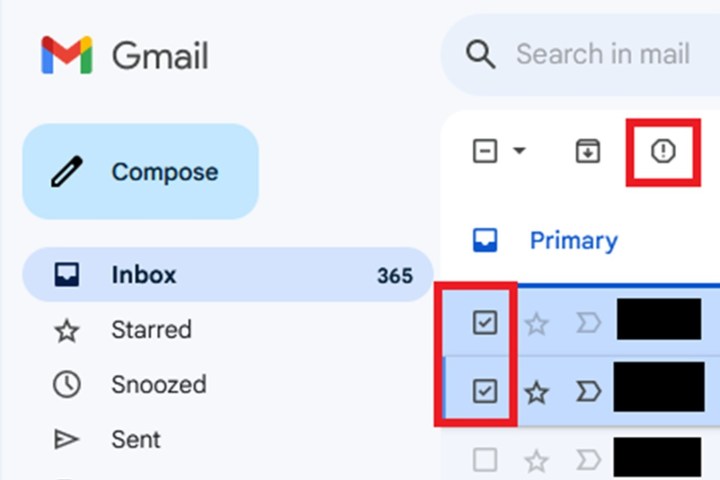
Selecting Report Spam in Gmail.

Alternatively:

  1. In your inbox, select an unwanted email.
  2. Click More (three vertical dots).
  3. Choose “Filter messages like these” to create a filter.
What is ‘Smishing’ and how to protect yourself?
Beware of a significant scam targeting your phone—a scheme known as “smishing,” a blend of “SMS” and “phishing.” In this tactic, perpetrators attempt to extract your personal and banking details through unsolicited text messages on mobile devices. They pose as government agencies, companies you may have engaged with, or even a package delivery service. Urgent-sounding messages, such as claiming a free gift with a nominal “shipping fee” or warning about suspicious account activity, aim to grab your attention. According to Amy Nofziger, AARP’s director of fraud victim support, scammers often impersonate banks, creating a sense of urgency by falsely reporting

Blocking and Reporting Spam in Outlook on the Web

In Outlook, block senders and report spam to maintain a clutter-free inbox.
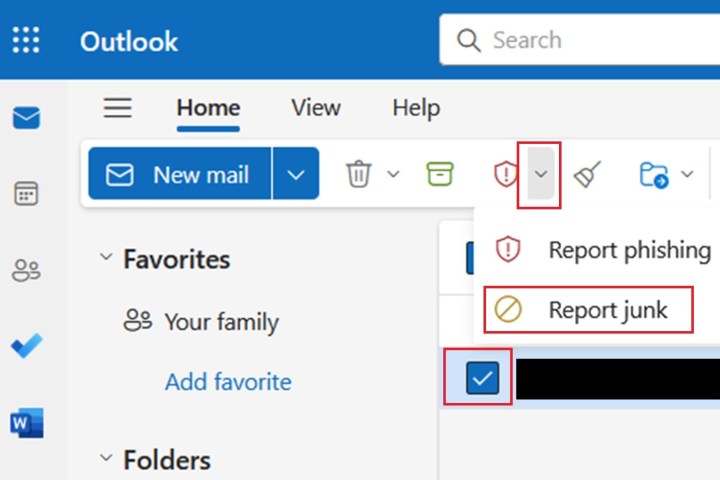
Selecting Report Junk in Outlook on the web.

Blocking a Sender:

  1. In Outlook on the web, select the email.
  2. Click More options (three dots).
  3. Choose “Block” > “Block sender” > “OK.”
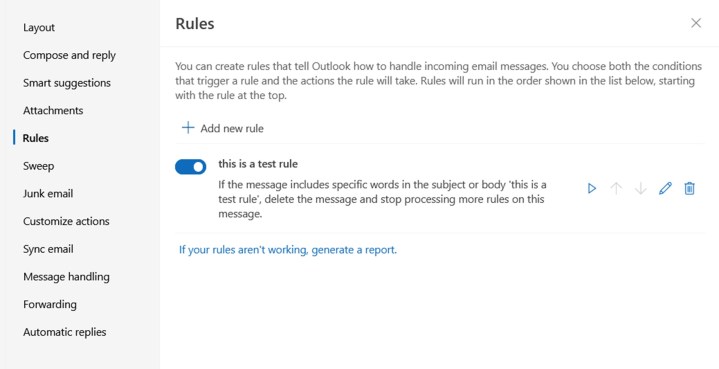
Rules screen on Outlook on the web.

Reporting Spam:

  1. Log into Outlook on the web.
  2. Select the spam email.
  3. Click the Down arrow next to the red shield icon.
  4. Choose “Report junk.”

Using Filters (Rules) in Outlook on the Web

Outlook on the web employs rules as filters to manage spam effectively.

  1. Access Outlook on the web.
  2. Click More options and choose “Rules” > “Manage rules.”
  3. Select “Add new rule” and fill out the form.
  4. Name the rule, set conditions, and specify actions.
  5. Click “Save.”

Additional Strategies to Combat Spam

If blocking and reporting prove insufficient, consider these additional measures:

Unsubscribe from Promotional Emails:

Open promotional emails and locate the unsubscribe link at the bottom. Unsubscribing removes you from the mailing list.

 Keep Your Email Address Private:

Avoid posting your main email address on websites or social platforms to minimize exposure to spammers. While work emails may be publicized, exercise caution with personal ones.

By implementing these techniques, you can proactively reduce the influx of spam and maintain a more streamlined inbox experience.
ShareTweetSendShare
Previous Post

Pakistan players, staff come with Christmas gifts for Aussies

Next Post

Watch: Ronaldo and Conor McGregor share awkward moment during boxing match

Related Stories

photo, online
Business & Stock

Pakistani Startup World Context Holds Robotics Hackathon at UC Berkeley

October 3, 2026
Mobile Phones

Think Your WhatsApp Is Only Open on Your Phone? You Might Want to Check Again

October 1, 2026
File photo
Mobile Phones

How to Keep Your WhatsApp Account Safe: PTA Issues New Guidelines

September 28, 2026
File photo
National

PTA Issues Nearly 300 Licenses to Expand Internet Access Across Pakistan

September 28, 2026
Next Post

Watch: Ronaldo and Conor McGregor share awkward moment during boxing match

Latest

Gold Prices Surge in Local Markets; Per Tola Rate Increases by Rs 900

6 hours ago

Pakistani ID Services Decoded: Find Out Which NADRA Facility Offers What

7 hours ago

Empowering Grassroots Economy: Pakistan to Expand Small Business Financing

7 hours ago

Blood-Stained Note Reveals Despair, Harassment, and Poverty Behind Gulshan-e-Hadid Tragedy

8 hours ago

Karachi CTD Raids: Three BLA Suspects and One Sindh Revolutionary Army Suspect Arrested

9 hours ago

Loose Bolts Before the Crash? Passenger’s Claim Raises Questions Over Train Disaster

10 hours ago

Pakistani Journalist Munir Ahmed Publishes New Book on Russia-Ukraine War

10 hours ago

Global Oil Prices Fall, but Pakistan Raises Diesel Rates, Where Is the Public Relief?

11 hours ago

Latest

Gold Prices Surge in Local Markets; Per Tola Rate Increases by Rs 900

6 hours ago

Pakistani ID Services Decoded: Find Out Which NADRA Facility Offers What

7 hours ago

Empowering Grassroots Economy: Pakistan to Expand Small Business Financing

7 hours ago

Blood-Stained Note Reveals Despair, Harassment, and Poverty Behind Gulshan-e-Hadid Tragedy

8 hours ago

Karachi CTD Raids: Three BLA Suspects and One Sindh Revolutionary Army Suspect Arrested

9 hours ago

Loose Bolts Before the Crash? Passenger’s Claim Raises Questions Over Train Disaster

10 hours ago

MM Digital (Pvt.) Ltd.

MM News is a subsidiary of the MM Group of Companies. It was established in 2019 with the aim of providing people of Pakistan access to unbiased information. Contact Details: 03200201537

Quick Links

  • Home
  • Advertise
  • MM News Urdu
  • The Other Side-Pakistan
  • Contact Us
  • Privacy Policy

Top Pages

  • Latest News
  • Showbiz
  • OP-ED
  • Technology
No Result
View All Result
  • Latest News
  • National
  • Crime
  • Opinions

© Copyright 2024 MMNews - All Rights Reserved.